AI that doesn't just answer.
AI that answers right.
The Aletus AI Suite makes sure your team use AI in a way that's consistent, controlled, and construction-specific every time.
Your team is using AI.
Nobody's in control of it.
Nobody knows how to prompt it properly
Most users type a vague question and accept whatever comes back. The quality of the output depends entirely on who's asking – not on what the business actually needs.
Every answer is different. None are reliable.
Two people ask the same question and get two completely different answers. There's no consistency, no repeatability, and no way for leadership to trust what AI is telling the team.
Hallucinations go unchallenged
Generic AI tools have no construction knowledge. Without a specialist layer underneath, plausible-sounding errors go undetected and get acted on.
Four Tools. One Mind.
Complete Control.
ConstructionCRM didn't patch generic AI. We built an intelligent prompting architecture from the ground up – starting with a construction knowledge foundation and layering in tools that give administrators, power users, and everyday team members exactly the right level of control.
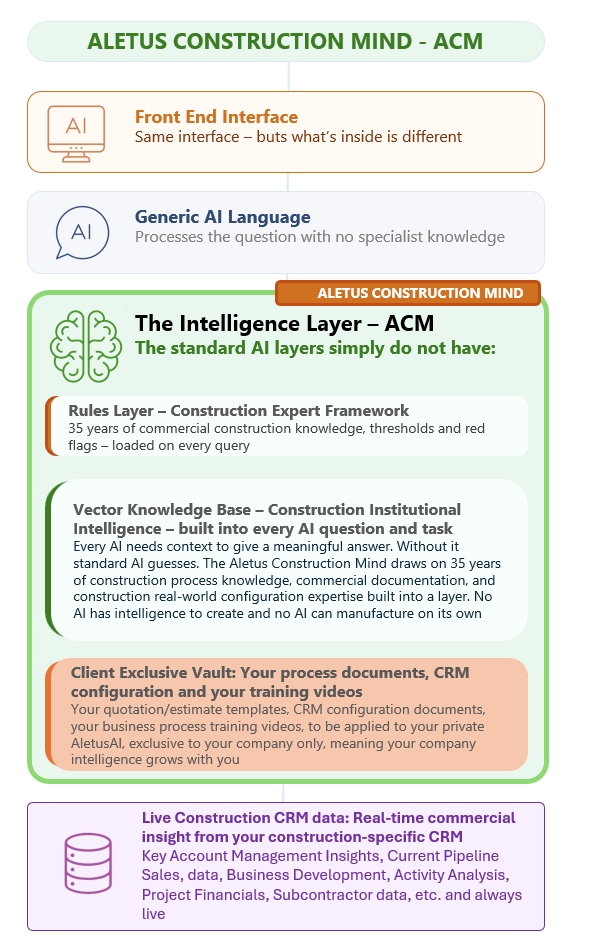
Aletus Construction Mind
The knowledge foundation every query passes through
→1. Prompt Builder
Build layered prompts by selecting pre-made components
→2. Prompt Manager
Share approved prompts across the business instantly
→3. Power Prompt Builder
Free-text every layer for maximum precision
→4. Reverse Engineer Builder
Load any document – get the prompt that creates it
Aletus Construction Mind
Before any tool, prompt, or question reaches the AI, it passes through the Aletus Construction Mind – a knowledge layer built from over 30 years of construction industry process management experience.
This isn't a generic AI model reading your data. The ACM understands tender stages, NEC contract forms, supply chain structures, PQQ and ITT processes, Barbour ABI signals, and the commercial dynamics of how construction businesses actually win and deliver work.
The result is that every answer Aletus gives is grounded by deep construction expertise – not general language patterns. Hallucinations are construction-aware, contextually filtered, and far less likely to slip through unchallenged.
- All five Aletus tools sit on top of the ACM – it's always running underneath
- 30+ years of construction process knowledge baked into the intelligence layer
- Understands tender stages, contract forms, supply chain roles and commercial signals
- Reduces hallucinations and ensures outputs make sense to construction professionals
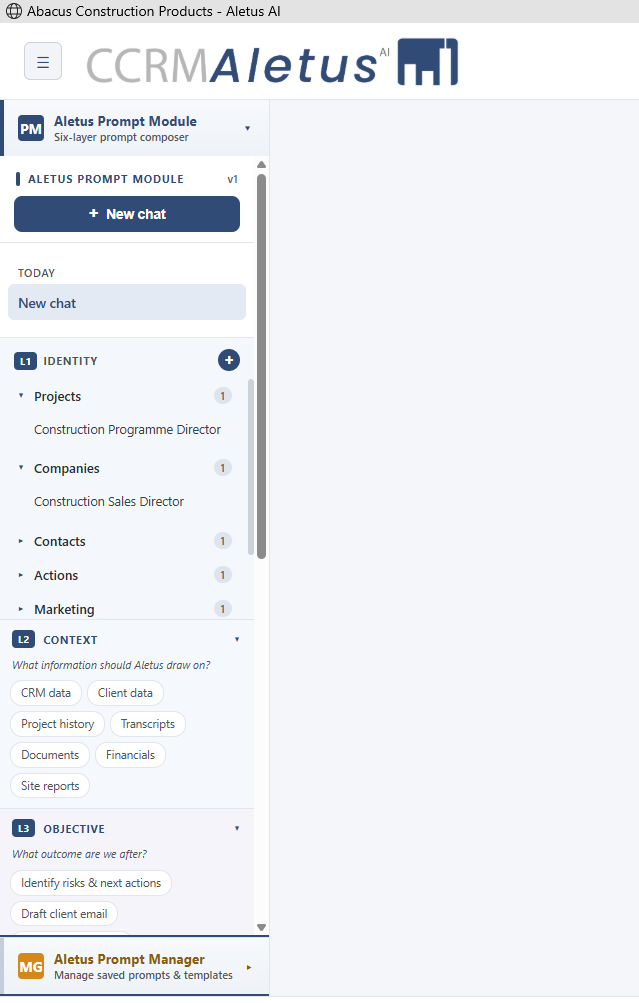
Aletus Prompt Builder
Most people don't know how to construct a great AI prompt. The Aletus Prompt Builder solves this without requiring them to learn.
Administrators build a library of reusable prompt components – identities, constraints, objectives, and output formats – and store them by layer. Users then select from these pre-approved building blocks to assemble a powerful, structured prompt in seconds.
Your least AI-literate team members can produce the same quality output as your most experienced – because the hard thinking was done once, by the right people, and stored for everyone.
- Admins build and store reusable prompt components by layer
- Users select components – no prompt engineering knowledge needed
- Identity, constraint, objective and output layers kept separate and combinable
- All outputs are grounded through the ACM before being returned
As a Commercial Director, review my pipeline this quarter for all bids over £500K. Highlight at-risk tenders and deadlines within 10 days. Return as a table with a recommended action column.
Aletus Prompt Manager
Some users don't want to build anything. They want to open Aletus, click a button, and get the right answer every time – without thinking about how the question is framed.
.png)
The Aletus Prompt Manager lets administrators create, name, and publish complete ready-to-use prompts across the business. A prompt called "Q3 Pipeline Dashboard" already has the identity, context, and output format built in. Any user simply clicks it and Aletus returns a consistent, controlled response.
This gives leadership teams repeatability and confidence. Everyone asking the same operational question gets the same quality of answer with the same guardrails, every time.
- Administrators publish pre-built prompts for the whole organisation
- Users click to run – no configuration or typing required
- Consistency and repeatability across departments and seniority levels
- Administrators control which prompts are visible to which user roles
Power Prompt Builder
For administrators who need complete control over the prompt architecture, the Power Prompt Builder presents every layer as an open field – no chips, no dropdowns, no constraints.
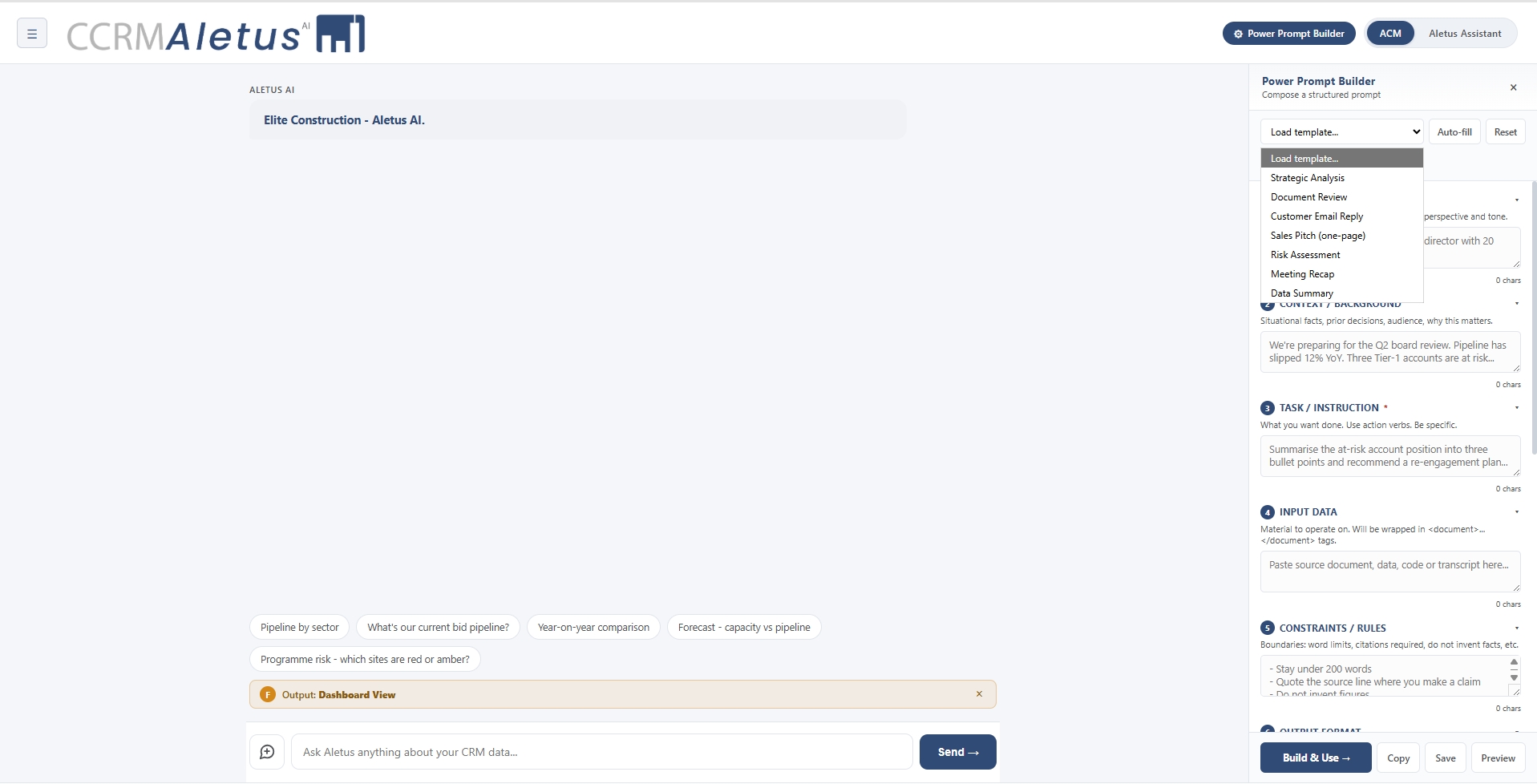
You type exactly what you want into each prompt layer: the identity, the context, the objective, the constraints, and the output format. This is where the templates stored in the Prompt Builder, and the published prompts in the Prompt Manager, are authored and refined.
It requires more prompt knowledge to use well, but gives trained administrators the full expressive power of structured prompting – and results far more precise than anything a freeform query can achieve.
- Full open-text access to every prompt layer
- Used to create the templates and shared prompts the rest of the business relies on
- Ideal for experienced administrators building department-specific libraries
- All prompts are still routed through the ACM before output
Reverse Engineer Builder
Sometimes you already have the output you want. A board report, a pipeline email, a project summary – something that was produced once and should be reproducible on demand, every week, for every project.

The Reverse Engineer Builder lets you upload that document, email, dashboard screenshot, or report. Aletus analyses what it contains and generates the structured prompt that would reliably reproduce it – with identity, context, objective, and output layers already populated.
That prompt can then be stored in the Prompt Manager and shared across the business. What was once a one-off becomes a consistent, repeatable, on-demand intelligence output for any user with the right access.
- Upload any document, email, dashboard or report
- Aletus reverse engineers the prompt that would produce it
- Instantly promotes a one-off output into a repeatable business prompt
- Saves to the Prompt Manager for team-wide access
One suite of AI.
Every level of user.
From the board to the site office, every member of your team has the right tool for how they work with AI – for complete control, structure, and common-sense usage across your business.
Aletus Construction Mind
30 years of construction knowledge. Every query passes through it.
Always OnPrompt Builder
Select pre-built layers. Build a structured prompt without typing.
All UsersPrompt Manager
Click a shared prompt. Get a consistent, approved answer instantly.
All UsersPower Prompt Builder
Free-text every layer. Build the prompts others rely on.
AdministratorsReverse Engineer Builder
Upload any output. Get the prompt that reproduces it on demand.
AdministratorsSee the Aletus AI Suite in action.
Book a 30-minute demo and we'll walk through all five tools using a live construction dataset matched to your business type.